

Table of Contents

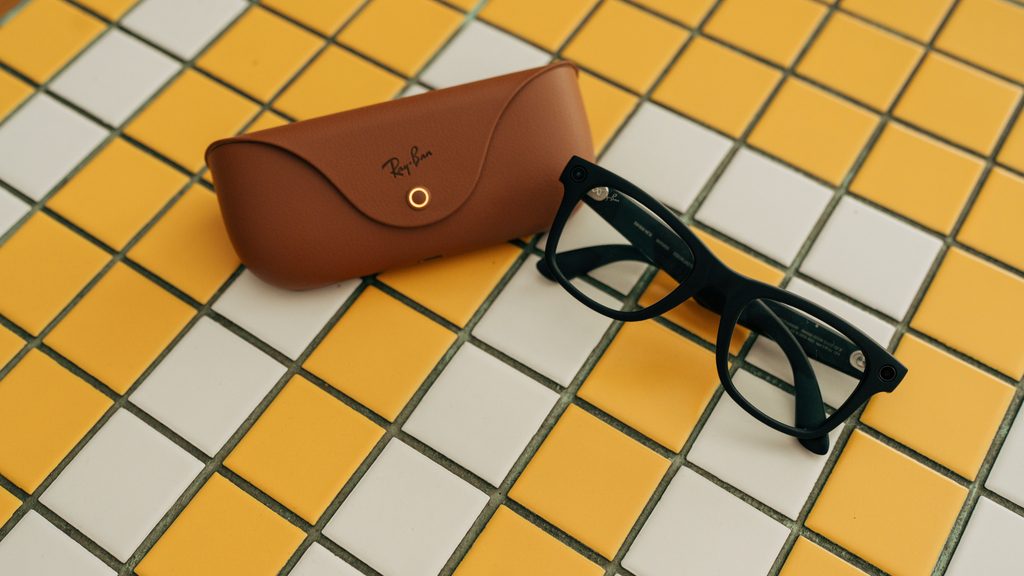
For almost two decades, digital product design has centered on the smartphone screen. Developers learned how to organize information into menus, buttons, cards and scrolling feeds. Businesses built services around taps and notifications, while customers became accustomed to reaching for a phone whenever they needed information.
Smart glasses introduce a different model. Instead of asking users to look down at a screen, they can provide assistance through voice, audio, cameras and, in some models, small visual displays. This does not mean the smartphone will disappear. It means that some digital interactions may no longer need to begin on a phone.
For designers and developers, that change requires more than shrinking an existing app. It calls for a new understanding of context, attention and user intent.
The App May Become Invisible
A traditional app has a visible destination. The user opens it, navigates through its interface and chooses a function. With smart glasses, the best experience may have no conventional interface at all.
Someone walking through an unfamiliar city could ask for directions and hear the next instruction. A traveler might request a translation during a conversation. A technician could identify a piece of equipment and retrieve the relevant service information. In each case, the digital service remains present, but the user does not need to browse through several screens.
This changes the role of interface design. Instead of deciding where to place buttons, product teams must determine how users will express intent and how the service will respond. Voice, touch controls on the frame and visual context can all become inputs.
The experience must also be brief. A phone user can pause and examine a detailed page, but someone wearing glasses may be walking, talking or completing a physical task. The service needs to provide the most useful answer first and offer more detail only when requested.
Cameras Give Services Visual Context
One of the most important differences between phones and smart glasses is the position of the camera. A phone camera shows what the user deliberately points it toward. Glasses can capture the wearer’s natural point of view, making visual assistance feel more immediate.
Modern camera glasses demonstrate how photography, video, voice controls and AI can be incorporated into familiar eyewear. Ray-Ban Meta glasses, for example, allow people to capture images hands free and ask questions about what they are seeing. For app developers, this introduces a valuable form of context. A service may be able to respond to the object, sign or scene in front of the user instead of requiring a long written explanation.
A travel service could recognize a landmark and provide a short description. A shopping assistant might answer a question about a product. A maintenance application could read an equipment label and retrieve the correct manual. An accessibility service may describe relevant objects or text in the surrounding environment.
These interactions should always remain under the user’s control. Apps need clear permission requests and obvious signals when the camera is active. They should capture only the information required for the requested task and avoid retaining visual data without a legitimate reason.
Voice Becomes a Primary Interface
Voice interaction is often treated as an extra feature in smartphone apps. On screenless smart glasses, it can become the main way users control a service.
Good voice design is not simply a matter of reading a visual interface aloud. Spoken interaction has its own limitations. Users cannot scan several audio options as quickly as they can examine a list. They may also be in noisy environments or in places where speaking to a device would be uncomfortable.
Responses should therefore be concise and easy to interrupt. If the system is uncertain about a request, it should ask a focused question instead of presenting a long explanation. Important information may need to be repeated or transferred to the phone for later review.
Designers should also provide alternatives. A discreet touch control can be more appropriate than voice during a meeting or on public transportation. Users should be able to move between voice, audio, touch and phone interfaces without losing their progress.
Services Must Understand the Moment
Smart glasses can potentially receive information from cameras, microphones, motion sensors, location services and a connected phone. That creates opportunities for more relevant assistance, but it also creates a risk of constant interruption.
A useful service must understand not only what information is available but whether this is the right moment to present it. A navigation instruction is valuable shortly before a turn. The same instruction is distracting if it arrives too early or interrupts a conversation.
Product teams will need stronger rules for prioritizing notifications. Urgent and time sensitive information may deserve immediate delivery. Most other content should wait until the user asks for it or move to a companion phone app.
Success should not be measured by how many alerts a service can deliver. It should be measured by how often the service provides the right information without demanding unnecessary attention.
Apps Will Extend Across Devices
The screenless future is unlikely to belong to a single device. Smart glasses will often work as part of a wider system that includes a phone, computer and cloud services.
Google’s Android XR documentation already distinguishes between audio glasses and display glasses, since different devices support different forms of interaction. It also describes glasses experiences that extend an existing phone app and reuse its underlying business logic.
This suggests that developers should think in terms of connected experiences rather than separate applications. Glasses may handle immediate actions such as capturing a photo, hearing a reminder or requesting a quick answer. The phone can handle account settings, detailed comparisons and longer content. A computer may remain the best place for complex work.
Continuity will be essential. If a user begins a task through the glasses, the related information should be easy to find on another device. Repeating the same request or rebuilding context would make the wearable experience feel incomplete.
Accessibility Must Shape the Design
Smart glasses may improve access to digital services for people who have difficulty using a conventional screen. Voice controls can support hands free interaction. Audio descriptions may communicate visual information, while live transcription and translation can support communication.
However, no single interaction method works for everyone. Audio only experiences may exclude users who cannot hear the response clearly. Voice only controls may be difficult for people with speech differences or for anyone in a noisy setting. Small visual displays may create other readability challenges.
The World Wide Web Consortium’s developing accessibility guidance explicitly considers wearable devices, virtual reality and augmented reality. Product teams should offer several ways to receive information, adjust timing and control the service. Accessibility testing should also include people with a range of real needs rather than relying entirely on automated checks.
Privacy Must Be Visible
Smart glasses place cameras and microphones close to everyday social interactions. A technically legal design can still fail if it makes users or bystanders uncomfortable.
Trust depends on making data practices understandable. People should know when the camera is operating, what information is being processed and whether anything is being stored. Recording indicators should be difficult to overlook or disable. Sensitive tasks should require deliberate confirmation rather than activating automatically.
Developers should also collect less information whenever possible. If a request can be processed on the device, sending the full recording to a remote server may be unnecessary. If the service needs only a product code, it may not need to retain the entire image.
Privacy is not simply a compliance task. It is part of the user experience and a condition for long term adoption.
Designing for Attention, Not Engagement
Smartphone apps have often been designed to keep users looking at a screen. Smart glasses require a different goal. Their best feature may be their ability to provide help and then disappear from attention.
The most successful services will probably not reproduce full mobile apps in front of the user’s eyes. They will identify a small number of moments when hands free access, visual context or immediate audio genuinely makes a task easier.
A screenless future does not eliminate interface design. It expands it beyond the rectangle of a phone. Developers must now design conversations, transitions between devices, privacy signals and moments of silence.
Smart glasses will create value when technology supports what the user is already doing instead of pulling attention away from it. That is both the challenge and the promise for the next generation of apps and digital services.
Disclaimer
This article is for informational purposes only. Technology, product features, regulations, and industry developments may change over time. Readers should verify details with official sources before making decisions.